
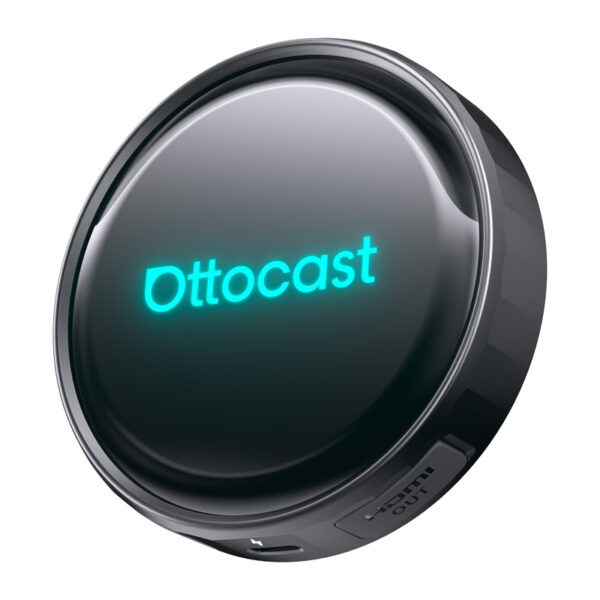
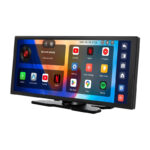
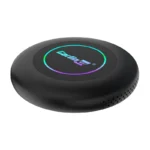
Ottocast OTTOAIBOX P3 Pro belaidis „Android“ adapteris
195,38 €
Užsakomoji prekė.
Numatoma atsiėmimo*/išsiuntimo** data:
 2026-10-09
*atsiėmimo taške Tarandės g. 2 - 42 boksas, Vilnius
**pristatymas kurjeriu papildomai 1-2 darbo dienos nuo išsiuntimo
- Aprašymas
- Atsiliepimai (0)
Aprašymas
Ottocast OTTOAIBOX P3 Pro belaidis Android adapteris
Ottocast OTTOAIBOX P3 Pro belaidis Android adapteris yra kompaktiškas įrenginys, kurį prijungiate prie automobilio USB prievado, kad išplėstumėte jo galimybes naudodami belaidį CarPlay ir Android Auto, pilną Android 13 sistemą su OttoDrive 3.0 sąsaja, interneto prieigą (Cloud SIM arba SIM kortelė), išmanųjį valdymą balsu ir daugialypės terpės funkcijas, įskaitant papildomų ekranų palaikymą per HDMI. Dėl 8 branduolių Snapdragon 6225 procesoriaus viskas veikia sklandžiai ir stabiliai, todėl patogiai naudositės navigacija, muzika, programėlėmis ir srautiniu perdavimu – be laidų ir sudėtingo diegimo.

Sklandus veikimas ir OttoDrive 3.0 sistema
Adapteris veikia su Android 13 operacine sistema ir patentuota OttoDrive 3.0 sąsaja, užtikrinančia aiškų ir intuityvų valdymą. Sistema reaguoja greitai, o perjungimas tarp programėlių vyksta sklandžiai net ir intensyviai naudojantis. Visa sistema sukurta galvojant apie vairuotoją, todėl svarbiausios funkcijos yra lengvai pasiekiamos vairuojant. Be to, sąsają galima pritaikyti pagal savo pageidavimus, įskaitant valdiklių išdėstymo ir rodomų duomenų vienetų keitimą.

Belaidis CarPlay ir Android Auto
Po pirminio susiejimo adapteris automatiškai prisijungia prie jūsų telefono kiekvieną kartą užvedus automobilį. Jokių laidų reiškia daugiau patogumo ir mažiau netvarkos salone. Sistema veikia sklandžiai, todėl galite lengvai naudotis žemėlapiais, skambinti ir klausytis muzikos. Šis sprendimas ypač pasiteisina kasdienėse kelionėse, kur svarbus greitis ir paprastumas.

Android programėlės ir padalinto ekrano funkcija
Naudodami pilną Android sistemą, galite diegti ir naudoti programėles tiesiai automobilio ekrane. Tai suteikia daugiau laisvės nei standartinės daugialypės terpės sistemos ir leidžia pritaikyti funkcijas savo poreikiams. Be to, padalinto ekrano funkcija leidžia vienu metu rodyti dvi programėles, pavyzdžiui, navigaciją ir muzikos grotuvą. Dėl to galite patogiai valdyti maršrutą ir daugialypę terpę neperjunginėdami vaizdų.

Interneto ryšio lankstumas
Įrenginys siūlo „Dual Internet“ funkciją, leidžiančią pasirinkti, kaip prisijungti prie tinklo. Galite naudoti Cloud SIM, kuri suteikia interneto prieigą be fizinės SIM kortelės, supaprastindama sąranką ir panaikindama būtinybę naudoti telefono viešosios prieigos tašką. Arba galite įdėti SIM kortelę ir naudotis nepriklausomu 4G LTE ryšiu. Tai suteikia didesnę ryšio stabilumo kontrolę ir lankstumą naudojantis internetu.

Pramogos be ribų – ne tik priekyje sėdintiems
Integruota HDMI išvestis leidžia transliuoti vaizdo įrašus į papildomus automobilio ekranus. Keleiviai gali žiūrėti filmus ar naudotis programėlėmis galvos atramų monitoriuose, kol vairuotojas pagrindiniame ekrane naudojasi navigacija. Šis sprendimas padidina kelionės komfortą, ypač ilgesnių išvykų metu. Taip kiekvienas keleivis gali mėgautis pramogomis savo nuožiūra.

Išmanusis balso asistentas
Integruotas išmanusis balso asistentas leidžia valdyti funkcijas nenaudojant rankų. Galite duoti paprastas komandas dėl muzikos, navigacijos ar pagrindinių nustatymų. Tai sumažina būtinybę vairuojant naudotis ekranu, o tai padidina saugumą. Valdymas balsu taip pat daro įrenginio naudojimą intuityvesnį.

Europos standartams pritaikyta sąsaja
Sistema rodo duomenis Europoje naudojamais vienetais, tokiais kaip km/h greičiui ir bar slėgiui. Tai reiškia, kad vairuojant nereikia konvertuoti verčių. Sąsaja yra visiškai pritaikoma, todėl galite ją suderinti su savo pageidavimais ir įpročiais. Tai ypač svarbu vartotojams, vertinantiems aiškumą ir paprastumą.

Plug & Play diegimas ir informacija apie suderinamumą
Diegimas susideda iš adapterio prijungimo prie automobilio USB prievado. Tam nereikia jokių įrankių ar automobilio salono modifikacijų. Po greitos sąrankos įrenginys yra paruoštas naudoti. Dėl to adapteris yra prieinamas praktiškai kiekvienam vartotojui. Adapteris veikia tik automobiliuose, gamykliškai aprūpintuose laidine Apple CarPlay sistema. Tai reiškia, kad automobilio USB prievadas turi palaikyti duomenų perdavimą CarPlay funkcijai, o ne tik įkrovimą. Įrenginys neveiks senesniuose automobiliuose be šios funkcijos. Prieš perkant rekomenduojama patikrinti automobilio suderinamumą.

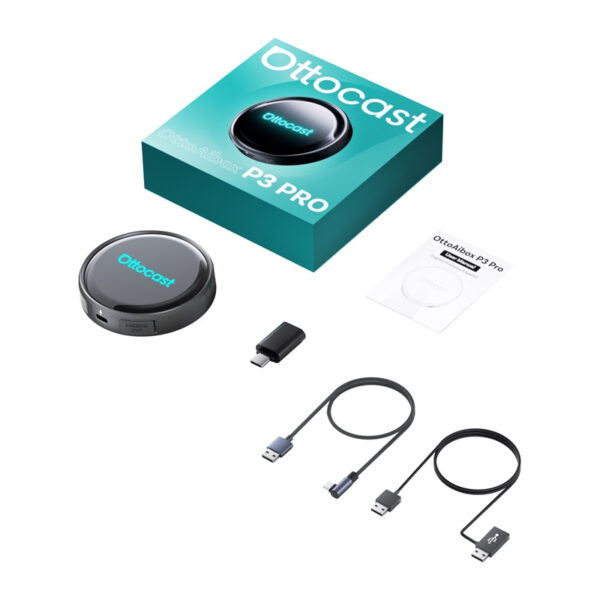
Komplektacija
- Ottocast OTTOAIBOX P3 Pro adapteris
- USB laidas prijungimui automobilyje
- USB adapteris
- Papildomas maitinimo laidas
- Vartotojo vadovas
| Gamintojas | Ottocast |
|---|---|
| Modelis | P3 Pro |
| Operacinė sistema | Android 13 su patentuota OttoDrive 3.0 sąsaja |
| Procesorius | Qualcomm® Snapdragon™ 6225 (8 branduolių) |
| Ryšys | CarPlay, Android Auto |
| Internetas | Cloud SIM + SIM kortelės lizdas (Dual Internet, 4G LTE) |
| Valdymas | Išmanusis balso asistentas |
| Išvestis | HDMI |
| Atnaujinimai | FOTA (sistemos atnaujinimai belaidžiu būdu) |
| Maitinimas | per USB prievadą |
| Sąsaja | pritaikoma |
| Papildomos funkcijos | Android programėlės, padalintas ekranas, srautinis perdavimas, daugiafunkciškumas |
Rašyti atsiliepimą gali tik prisijungę pirkėjai, kurie yra įsigiję šį produktą.











Atsiliepimai
Atsiliepimų dar nėra.